
AI customer operations
Every customer conversation, working together.
Kelpi gives your team one place for AI agents, human conversations, calls, appointments, follow-up, and customer context.
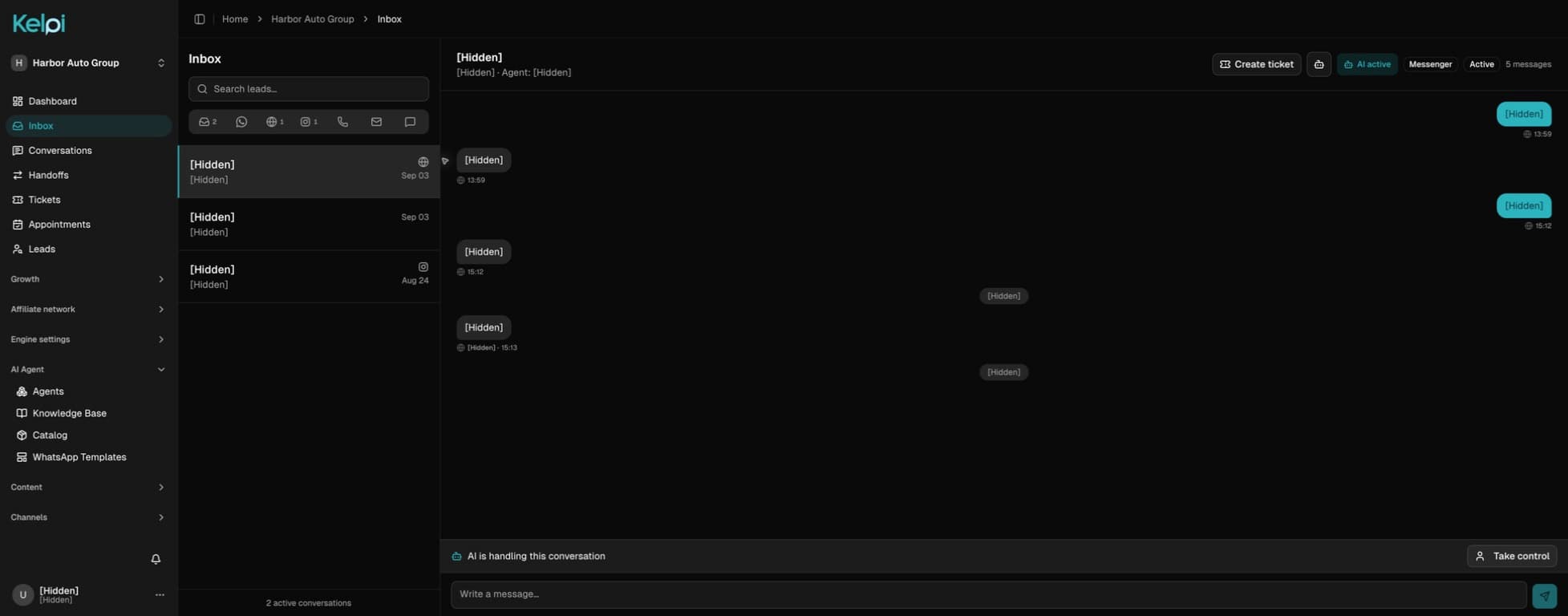
Actual Kelpi interface · Demo workspace · Personal details hidden
Inside Kelpi
One place to run the customer conversation.
See the work, the context behind it, and what happens next—without stitching together a dozen tabs.
Unified inbox
Every conversation, one operating view.
Move between SMS, iMessage, WhatsApp, and email without losing the customer, the owner, or the next action.
Actual Kelpi interface · Demo workspace · Personal details hiddenOpen full-size screenshot
Kelpi Connect
Keep the thread. Move as a team.
Turn incoming messages into coordinated customer care. One shared inbox, clear ownership, and the context your people and AI need to keep the conversation moving.
See Connect in a demoShared inbox
WhatsApp
Delivery date
I’m checking with shipping.
Forwarded email
Quote request
Can you send the details?
Web chat
Before I book
I have a quick question.
Delivery date
Human control
Customer
Could you check when my order will arrive?
AI agent
I’ll connect you with our support team to check the date.
- Assigned to Customer Care · Human control
Internal note · Team only
Needed before their event. Confirm the date with shipping.
Support advisor
I’m checking with shipping. I’ll follow up right here.
Meet customers where they write.
Bring configured WhatsApp, Instagram, Facebook, and Linq conversations into one inbox. Receive new email through forwarding and add web chat to your site.
Give every case a next step.
Assign conversations to a teammate or team, route them with rules, and link tickets when a request needs follow-up.
Keep your team in control.
Choose when AI or a person responds. Take over with the history intact, and coordinate through internal notes that stay within your team.
Kelpi call center
A call can begin with AI and end with the right person.
01 / 04
Start with the right group.
Organize sales, service, billing, locations, or any other specialty as teams. Kelpi uses team membership, agent presence, priority, and your answer mode to build the ring order.
- Online, busy, away, and offline presence
- Team queues and a default fallback group
- Human-first or AI-first call entry

AI assists the operation. Your team keeps control of the customer relationship.
AI voice for live advisors
Your expertise. An AI voice.

The advisor stays in control of what to say. When configured, the voice avatar listens to the caller’s context and delivers the advisor’s response in the selected voice, language, and tone.
Switch naturally
Move between the advisor’s live voice and the configured AI voice during the call.
Keep the record
The transcript and call context remain part of the same operational history.
Transfer with control
Send the caller to another person, a team, or the AI agent when the workflow requires it.
Ticket operations
The call ends. Ownership continues.
Turn an unresolved question into work your team can track. Create a ticket from the conversation or a post-call action item, keep the customer context attached, and give the next step an owner.
- Assignees, participants, and priority
- First-response and resolution targets
- Internal notes and customer email replies
Explore the ticket workflow
- 01
Capture the issue
Start from a conversation, call, or action item. Keep the ticket connected to the customer so the team can refer back to what was discussed.
- 02
Coordinate the response
Assign responsibility, add participants, and set priority. Track response and resolution targets while teammates collaborate through internal notes.
- 03
Keep the customer informed
Reply through the ticket’s customer email thread, update its status, and maintain the record of the work through resolution.

Appointment scheduling
From a conversation to a place on the calendar.
Help the customer choose a time your team can actually serve. Kelpi works with staff schedules, timezones, existing bookings, and slot capacity to connect the appointment to the right person and customer record.
- Staff schedules and available time slots
- Virtual or in-person appointments
- Confirmation, cancellation, and rescheduling
Explore the appointment workflow
- 01
Find a suitable opening
Use working hours, non-working days, current bookings, and capacity to offer available slots in the configured timezone.
- 02
Connect the booking
Keep the appointment linked to the lead and responsible staff member, with its time, duration, and visit details together.
- 03
Manage what changes
Review appointments in the calendar, update their status, and let configured AI agents help customers check or cancel upcoming visits.

Links during the call
Put the next step in the customer’s hands.
While you explain a product or arrange a service visit, send the relevant link directly from the call workspace. The customer can open it on their phone and continue the conversation with something concrete in front of them.
- Shared, reusable link templates
- Send by SMS, WhatsApp, or email
- Channel, sender, and delivery history
Explore the link-sharing workflow
- 01
Prepare the useful links
Save reusable templates for the destinations your team shares regularly, such as product information, appointment pages, or service instructions.
- 02
Send from the call
Choose the template and the available delivery channel in the live workspace, with the customer still on the line.
- 03
Keep a record
See the sender, channel, delivery state, and associated call in the send history so the next teammate knows what was shared.

The operating layer
A connected system for the moments between first message and finished work.
AI agents
Voice and messaging that know the customer
Build agents around your business knowledge, products, availability, and rules. They can qualify, answer, schedule, and bring in a person when judgment matters.
Call center
Humans and AI on the same operation
Run inbound and outbound calling with transcripts, outcomes, assignments, and customer context available to the team that takes over.
Automation
Follow-up that moves with the conversation
Trigger sequences, tasks, notifications, and workflow actions from real customer events instead of maintaining scattered reminders.
Service
From new inquiry to resolved ticket
Keep sales conversations, appointments, ownership, and support tickets connected to one customer record and timeline.
Connections
Meet customers where they already are.
Connect the channels and systems that feed the operation, so each new message, call, and update arrives with useful context and a clear next action.
Messaging
- SMS
- iMessage via Linq
- Email via Resend
Voice & intelligence
- Twilio
- ElevenLabs
- Vapi
- Deepgram
- OpenAI
- Claude
Customer systems
- HubSpot
- Microsoft Dynamics
- Zoho
- Odoo
- HelixCRM
- Web widget
- REST API
- Webhooks
Built around your work
One platform. Different ways to move the customer forward.
Chat-first businesses
Start with WhatsApp and Instagram. Give customers useful answers, share product links, and keep your small team on top of the next reply.
Explore chat for businessAutomotive sales & service
Connect the vehicle someone asked about to an informed callback, a test drive, financing questions, and their next service appointment.
Explore automotiveConnected call centers
Organize call groups around departments or locations, use availability to route the call, and transfer when another specialty is needed.
Explore call routingQuestions, answered
The practical details.
We’ll use a product walkthrough to answer the setup questions specific to your team.
Kelpi brings together messaging and lead sources including SMS and iMessage through Linq, WhatsApp, email, web chat, Instagram and Facebook conversations, forms, and Meta lead ads. Available connections depend on your setup and providers.
Explore Kelpi with your team
See how Kelpi fits your operation.
Bring your channels, handoff rules, and customer journey. We’ll walk through the product around the way your team actually works.
Book a product demo